Calculate the Percentage of work performed per Work Type
Updated Oct 21st, 2026
Who is this guide for?
Accounts Users, Accounts Supervisors and System Supervisors
Professional Indemnity Insurers often request the percentage of your work per work type. This guide will show you how to calculate this using the Fees Analysis by Work Type report
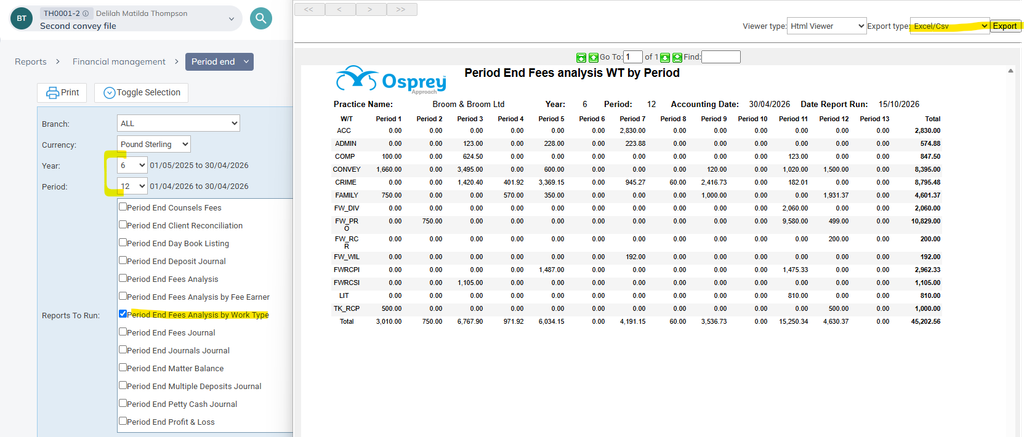
Run the Fees Analysis by Work Type for the year in question
- Navigate to Reports > Financial Management > Period End
- Select the period and year number you wish to report on
- Untick the Period End Fees Analysis by Work Type and click Toggle Selection – this should reverse all the ticks so that only the report you require is ticked.
- Click Print.
- When your report opens, select Excel/CSV from the Export Type list in the top right hand corner, and click Export.
Perform the Calculation
- When the report opens in Excel, click into Q1 and add your title Percentage of Work if required
- Click into Q2 and add the formula =O2/$O$16*100 (where O2 is the first work type’s Total, and O16 is the Total Total at the bottom – your row numbers may be different depending on the number of work types you have in your system. The Total Total needs to be made into an absolute cell reference by prefixing both the cell letter and number with a dollar sign to prevent it from changing when you copy the formula down)
- Copy the formula down to the last work type
- Double check the total comes to 100 by adding a sum on the bottom line