Reports: Last Movement Dates
Updated Mar 11th, 2026
Who is this guide for?
Accounts Users and Accounts Supervisors
This guide will take you through the Last Movement Dates report
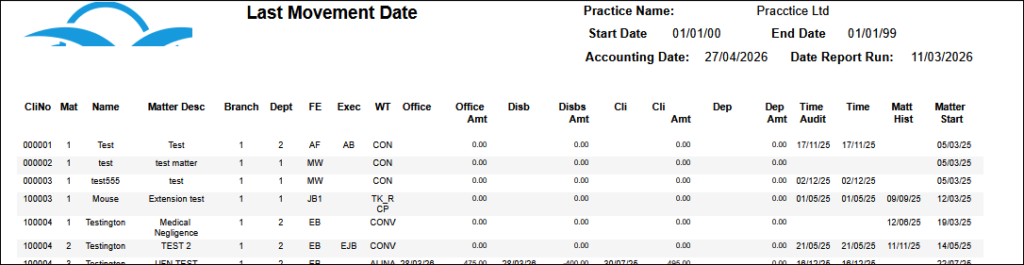
This report details the balances held in office, client, disbursement, deposit and also work in progress for all live matters.
Filter Options
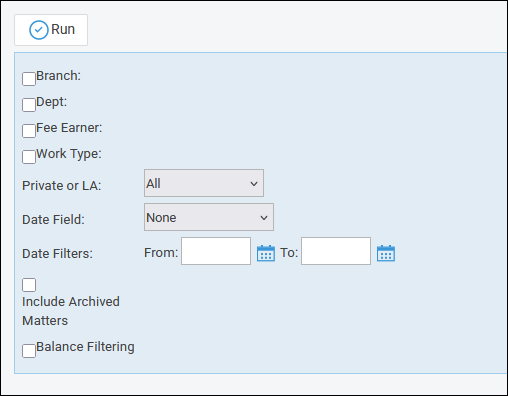
- Branch – Report on All branches or choose a branch
- Dept – Report on All departments or choose a department
- Fee Earner – Select one or more Fee Earners, or leave blank for all
- Work Type – Select one or more Work Type, or leave blank for all
- Private or LA – Select All, Private or LA (Legal Aid) matters
- Date Field – Choose the date field to filter on
- Client Dates
- Office Dates
- Disbursement Dates
- Deposit Dates
- Time Dates
- Matt Hist
- Date Filters – Enter a date range to show matters where the chosen accounting column has been posted to between these dates.
- Include Archived Matters – Tick this show live and archive matters
- Balance Filtering – This filter enables you to look for matters where the balance in a particular accounting column is a certain value. Mathematical operators available are:
- <> is not equal to
- = is equal to
- > greater than (choosing this opens a further option to set a range)
- >= greater than or equal to (choosing this opens a further option to set a range)
- < is less than
- <= is less than or equal to
List of Columns produced
- Client/matter number
- Client name
- Matter Description
- Branch
- Dept
- Fee Earner code
- Executive code
- Work Type code
- Office
- Office Amount
- Disbursements
- Disbursements Amount
- Client
- Client Amount
- Deposit
- Deposit Amount
- Time Audit
- Time
- Matter History
- Matter Start